Van and Truck Stock: Recording Parts Used on Every Job
For delivery-and-install and service fleets: keep stock per van or truck, load it from the warehouse, and record what each job used so the counts stay accurate.
A delivery-and-install business moves more than goods. Its vans and trucks also carry the brackets, fixings, hoses, cable, sealant and spare parts that turn a delivery into a finished installation, and a service fleet carries the parts it fits on site. Either way, each vehicle is a small warehouse on wheels, and in most small companies nobody knows exactly what is on it.
You will recognise the symptoms. A job can't be finished because the van was out of a part everyone assumed was there. The same consumable gets bought twice in a week from a local merchant. The stocktake never matches, and nobody can say what a job really cost in materials.
This guide sets out a simple way to run van and truck stock, and how it works in Movtro.
Treat each vehicle as a stock location
Start by thinking of stock as a set of places instead of one thing called "the warehouse":
- the warehouse or yard, split into shelves or bays if you want that detail;
- each van or truck, named so everyone recognises it, such as "Van 3, Ahmed" or "Truck LK21 ABC".
Once every vehicle is a place, three questions become easy to answer: what is on this van, what was moved onto it and when, and what came off it on which job.
Decide what to track
You don't need to track every screw. Track the things that matter:
- parts that are fitted and cost real money, such as valves, controllers, brackets and replacement units;
- materials used in quantity, such as cable, pipe, sealant and fixings sold by the box.
Leave out the truly trivial. Forty items you actually count are worth more than four hundred you don't.
Choose a sensible unit for each item: cable in metres, sealant in tubes, fixings in boxes. Whole numbers are easier to count on a van floor.
The movements that keep counts right
Nearly everything that happens to stock is one of a few movements:
- Receive: stock arrives from a supplier into the warehouse.
- Transfer: stock moves from the warehouse onto a van, or from one van to another.
- Reserve: stock is held for a planned job so it isn't used somewhere else first.
- Use: a driver or installer fits it on a job.
- Return: unused stock comes back.
- Adjust: a count is corrected after a stocktake, with a reason.
If every movement is recorded, the count for each van should match what is really on it. When it doesn't, the history shows where it went wrong.
Record usage on the job, not at the end of the week
The habit that matters most is this: whoever fits a part records it on the job at the time, choosing which van or store it came from. Asking "what did you use?" once a week gets you guesses.
When usage is recorded on the job, the van's count goes down, the job keeps a record of what was fitted, and the customer's report can list the parts used.
A weekly rhythm for small fleets
- Monday: restock each van from a standard list, as a transfer from the warehouse.
- Before big jobs: reserve the parts for that job so they are there on the day.
- Daily: drivers and installers record what they use on each job.
- Monthly: count each van and correct any differences with an adjustment and a reason.
- When something is missing: look at that van's history before blaming anyone.
How it works in Movtro
Parts and materials go under Inventory, each with a name and, if you want, a SKU, a unit and a unit cost. Each item can allow or refuse negative stock, which covers something being used before it has been received into the system.
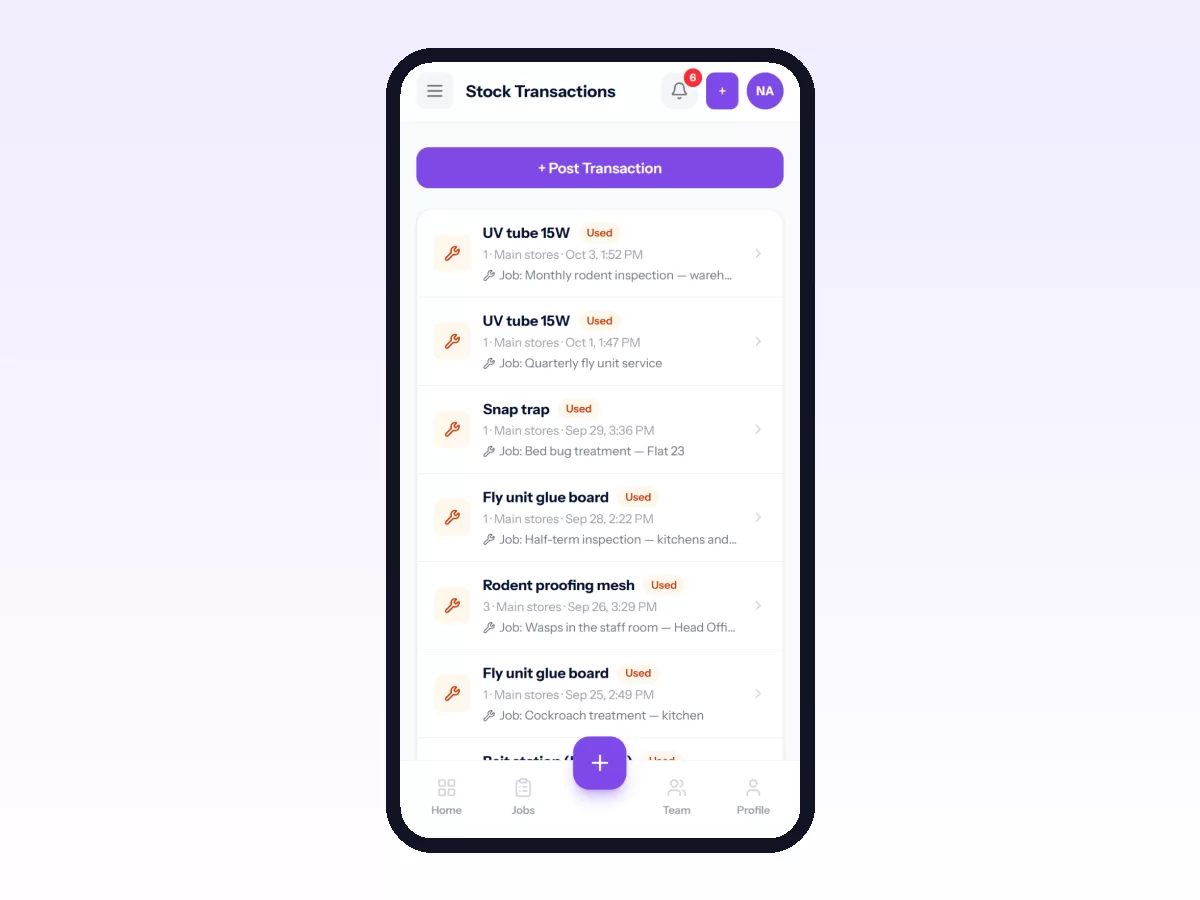
For warehouses and vehicles, add a warehouse and then its stock locations: shelves or bins, and one location for each van or truck. Stock levels are kept per location, so you can see what is on each vehicle.
Stock transactions cover receipts, transfers between locations, issues, reservations and their release, returns and adjustments. An adjustment needs a reason, and a reservation can be linked to the job it is for. Every movement stays in the transaction history and can't be edited or deleted. Mistakes are corrected with a new adjustment, so the history always adds up. Each transaction shows who posted it and, where relevant, the job it belongs to.
To record parts used on a job, the driver or installer opens Parts & materials on the job, picks the item, chooses Taken from which store? (their van or the warehouse) and enters the quantity. Stock at that location goes down in the same step, and the job keeps the record. For something not in your catalogue, such as a fitting bought locally, they can record it as free text on the job without touching stock. Recording parts needs a connection.
Parts used appear on the job's service report PDF, alongside the checklist, photos and signature.
There are things Movtro does not do here. It doesn't send low-stock alerts, create purchase orders or scan barcodes. Vehicles are stock locations you name. They are not linked to telematics or automatically to a driver, so give them clear names.
Related reading: how to manage parts and stock on jobs, parts and inventory for field service teams and proof of completion for delivery and installation crews. Or start free.
Frequently asked questions
How do I track stock on each van in Movtro?
Add a warehouse, then a stock location for each van or truck. Transfer stock from the warehouse to a van when it is loaded, and have drivers choose that van when they record parts used on a job. The van's count goes down as they do.
Can installers record parts they bought locally?
Yes. On the job they can switch to free text and enter the item and quantity. It stays on the job record but doesn't change stock, because the item isn't in your catalogue.
What happens if a stock count is wrong?
Post an adjustment for that location, raising or lowering the count, with a reason. Transactions can't be edited or deleted, so the correction and its reason stay in the history.
Does Movtro reorder stock automatically?
No. Movtro doesn't send low-stock alerts or create purchase orders. Check van and warehouse levels as part of your weekly restock.