Cleaning Checklists That Prove the Work Was Done
A paper checklist on a clipboard only proves that someone had a pen. How to build cleaning checklists that staff follow, with records a client will accept as proof.
Cleaning contracts are often won on price, and they are often lost when the cleaner cannot show the work was done. If a client says "the washrooms were not done on Tuesday", a paper checklist signed at the end of the shift rarely settles it. A cleaning checklist has to guide the work and also prove it happened.
Organise the checklist by area
A good checklist follows the route the cleaner walks:
- Entrance and reception: glass, floors, bins.
- Washrooms: toilets, basins, mirrors, consumables refilled, floor.
- Kitchen or pantry: surfaces, sink, appliances, bins.
- Offices and common areas: desks, floors, touchpoints.
Keep each item short enough to check. "Refill soap and paper towels" works; "Ensure washroom hygiene standards are maintained" does not.
Mark what cannot be skipped
Some steps matter more than the rest, such as sanitising touchpoints, restocking washrooms and locking up. Mark these as required so the visit cannot be closed until they are ticked. The other items stay on the list as guidance.
Proof that holds up
Anyone can tick a box. Proof comes from records the cleaner cannot change afterwards:
- clock-in with location, showing the cleaner was at the site at 6:05;
- the start of the job with location, showing work began at the site and not from the car park across the road;
- photos of the main areas after cleaning, especially where complaints tend to come from;
- timestamps on each step of the job;
- client sign-off where the contract asks for it.
Photos do not have to cover everything. Two or three shots of the areas the client cares about most, taken at the end, answer most disputes.
Make it work on a phone
Cleaners use their own phones, and signal is often poor in basements and plant rooms. The checklist has to be quick to tick, work offline and need no typing. If filling it in takes longer than the cleaning, it will be done at the end of the shift from memory.
Repeat work on a schedule
Most cleaning happens daily or several times a week. Set up each site's visits once with the checklist and the days, and they will appear on each cleaner's phone automatically. Monthly or quarterly deep cleans can run on their own schedule.
Review, and answer complaints with records
When a client complains, look up the visit: when and where it started, which items were ticked, and the photos. The record settles most complaints in minutes, and the rest show you where staff need training.
In Movtro
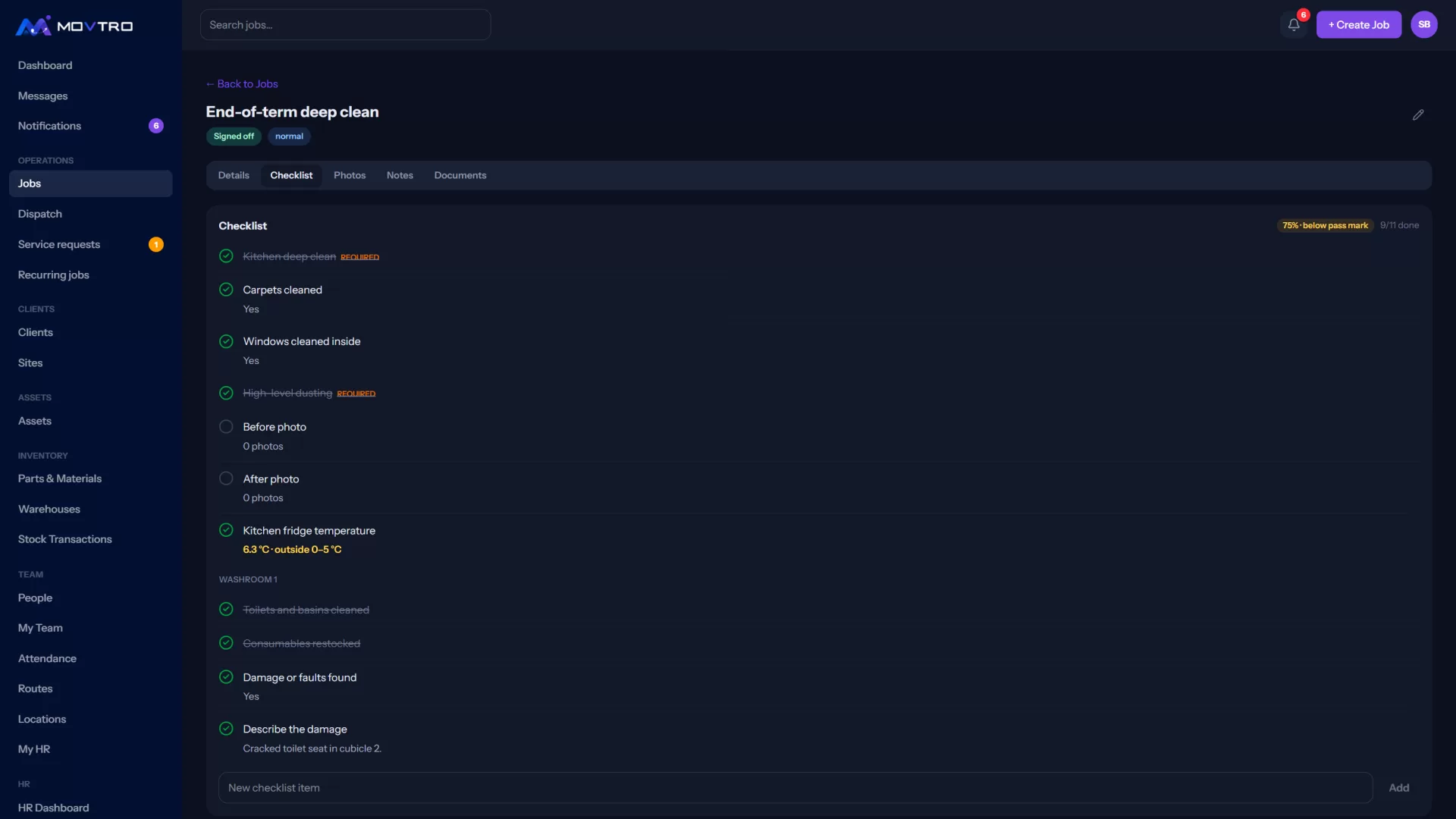
In Movtro, cleaning visits are jobs with a checklist, and any question marked required has to be answered before the job can be completed. A question can be a tick, yes/no/N-A, a reading with an expected range, short text, a pick-list or a photo of the step, and a follow-up question can be set to appear only after a particular answer. Cleaners clock in with location. When they start the job, Movtro records where they were and how far that was from the site, and flags visits that started far away. Photos, notes and a client signature can be added from the phone, without signal. Recurring jobs create daily, weekly or monthly visits and copy the checklist onto each one.
A job type can require at least one photo and the client's signature before a visit can be completed, and a checklist step can ask for a photo of a particular area. When the visit is done, the client can get a service report PDF showing what was checked, the photos and the signature. You can download or email it from the job, or have Movtro send it automatically when the job is completed.
Related reading: cleaning staff attendance tracking, field service checklists and proof of service. Or start free.