Proof of Service: Photos, Signatures and Location
When a customer disputes an invoice or an inspector asks for evidence, memory won't do. What proof of service is, what it should include, and how to collect it without slowing the job down.
Proof of service is the evidence that a job was done, and where, when and how it was done. Most of the time nobody asks for it. When someone does (a disputed invoice, an insurance claim, an audit, a complaint), having it turns a long argument nobody can win into a two-minute answer.
What counts as proof
Presence: the technician was at the site. A check-in that records their location when the work started, compared with the site, is simple and hard to argue with.
Time: when the work started and when it finished.
The work itself: photos before and after, a completed checklist, the parts used.
Acceptance: the customer's signature, or their approval of the finished work.
Findings: notes on what was found and what is recommended.
Between them, these answer the questions a dispute usually comes down to.
Collecting it without slowing the job
If evidence takes effort, it doesn't get collected. Make each piece quick:
- Photos take two taps and attach to the job, so they don't end up in the technician's camera roll.
- The checklist gets ticked as the work happens, not filled in afterwards.
- Location is recorded automatically when the job starts, with no separate step.
- The signature goes on the phone screen at the end.
Where proof matters most
- Maintenance contracts, where the customer only sees the result at renewal.
- Insurance and warranty work, where a third party wants evidence.
- Cleaning and facilities, where the work happens when nobody is watching.
- Regulated work such as fire safety and electrical, where records are required.
- Disputes over time and materials.
Good habits
- Photograph the problem as well as the fix.
- Photograph serial plates and meters once per visit.
- Get the signature before leaving. "I'll send it later" rarely happens.
- Keep evidence with the job so anyone can find it a year later.
In Movtro
In Movtro, starting a job records where the technician was and how far that was from the site, allowing for the phone's accuracy, and visits that started well away from the site are flagged. Photos and documents attach to the job, checklist items record who ticked them and when, parts used are logged, and the customer's signature is captured on the technician's phone, with or without signal. Customers following a job in the portal can see its photos and signature, and can approve the finished work or send it back. Every change of stage stays in the job's history.
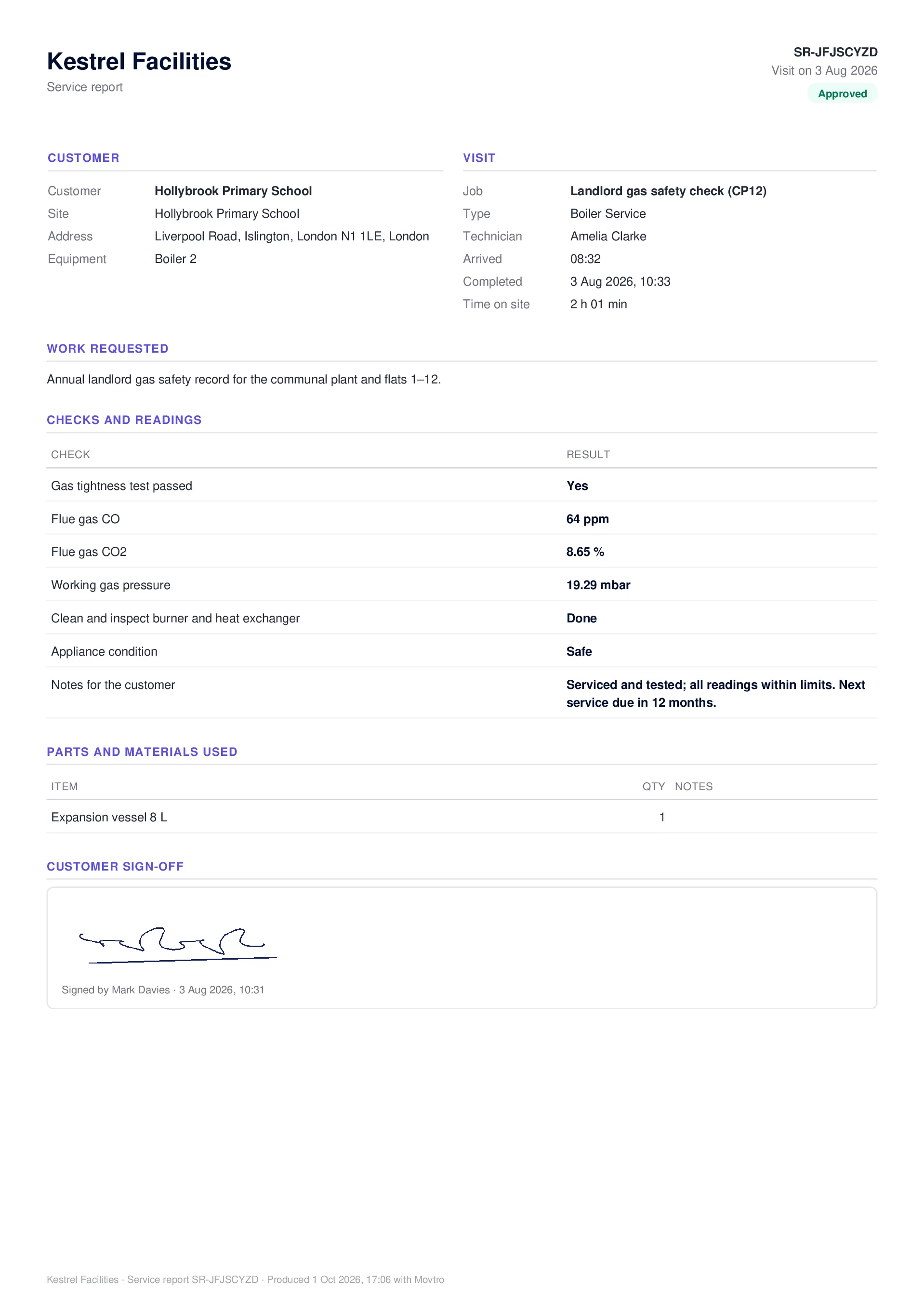
Each job type can require at least one photo and the customer's signature, and a job of that type can't be completed without them. When the job is done, Movtro turns the job record into a service report PDF with the checks and readings (any reading outside its expected range is marked), parts used, notes meant for the customer, photos and the signature. You can email it to the customer's contacts from the job, and customers with portal access can download it themselves.
See field service checklists, or start free.
Related: Cleaning Checklists That Prove the Work Was Done · Proof of Completion for Delivery and Installation Crews