Pest Control Service Reports and Chemical Usage Records
Commercial pest control customers need a record of every visit: what was found, what was treated and which products were used. This is how to capture it on site so the report is complete and believable.
For commercial pest control customers (restaurants, food factories, warehouses, hospitals, hotels), the service record is part of what they pay for. Their auditors and inspectors will ask to see it, and a record written up from memory at the end of the week won't hold up when they do.
What every visit record should contain
- The customer, site and date, with the times the technician arrived and left.
- The technician who did the work.
- The areas inspected and what was found in each: activity, signs, and conditions that encourage pests.
- The stations checked (bait stations, traps, monitors), with findings for each one.
- Treatments applied: where, which product and how much.
- Recommendations on proofing, hygiene or storage issues the customer should fix.
- Photos of findings and treated areas.
- The customer's sign-off.
Recording chemical usage
This is where records are usually weakest, and it is also where inspectors look hardest. On every job, record:
- the product used, by name
- the quantity, always in the same unit
- where it was applied, in the notes.
If products are taken from stock against the job, van stock stays correct and you can show for any site exactly which products went down and when. Check what your local regulations require you to record and make sure your checklist covers it.
Findings per station
Treat each bait station or monitor as a separate item at the site. Each visit then records every station, and over time you can show which stations have activity and whether it is going down.
Recommendations the customer acts on
A lot of infestations come from the customer's own conditions, such as gaps under doors, waste storage or spills. Write the recommendation down clearly on every visit with a photo, and check on it at the next one. If the problem carries on, that record protects you.
Capture on site, not later
A record made on the phone, on site, at the time is more complete and more believable than one typed up afterwards. The technician ticks through the checklist, adds photos, records the products used and gets the signature before leaving.
Sharing with the customer
Commercial customers should be able to see their visit records, photos and sign-off whenever they want, without having to ask your office for copies.
In Movtro
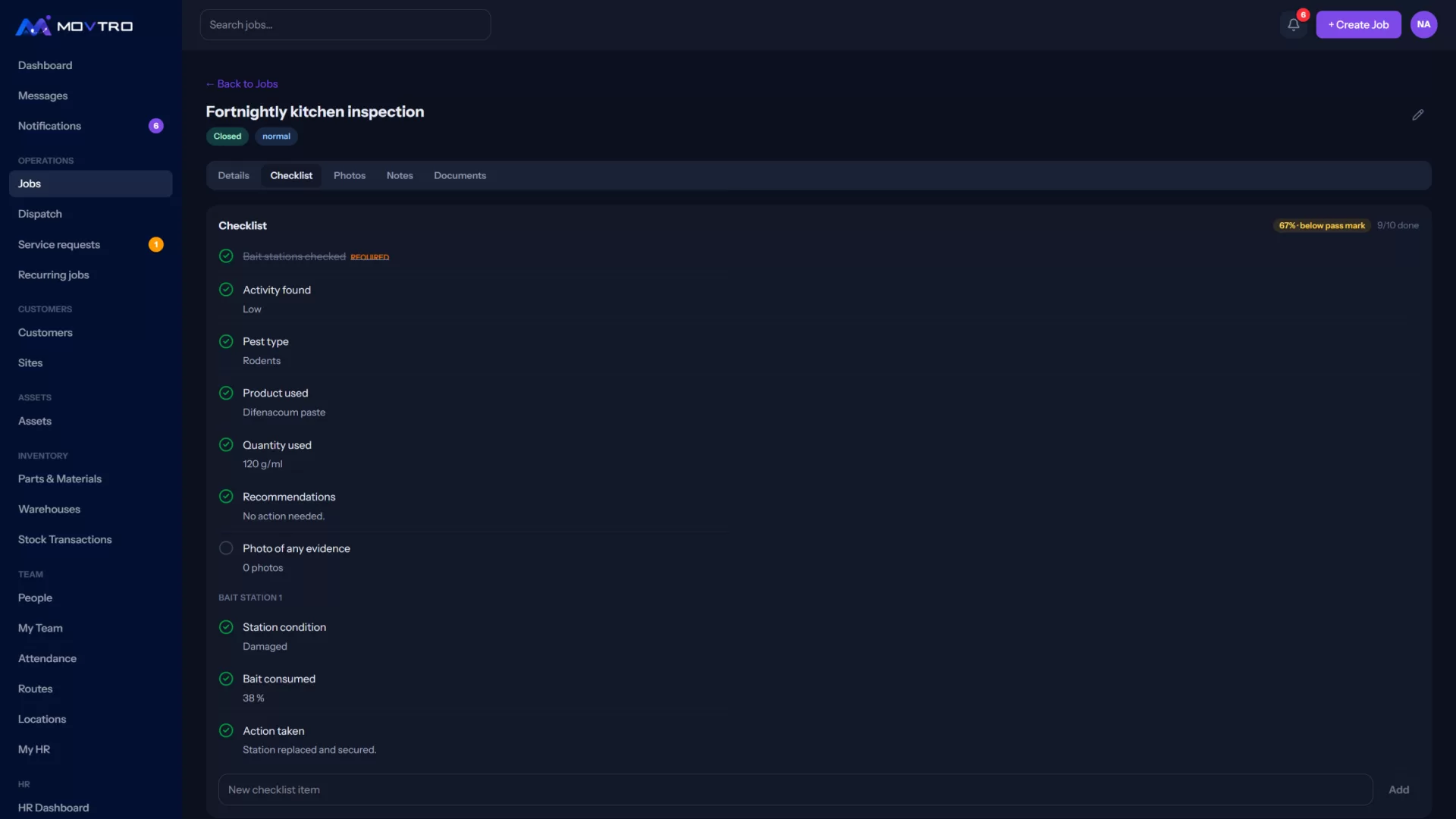
In Movtro each visit is a job with a checklist, photos, notes and the customer's signature, all captured on the phone and without signal. Chemicals are stock items with a unit. Technicians record the product and quantity used on each job, and that updates van stock. Starting the job records the time and where the technician was compared with the site. Stations can be set up as assets at the site, with one checklist line per station on a combined visit. Customers with portal access can see progress, photos and sign-off.
Every finished visit has a service report PDF built from the job, with the checklist answers, products and quantities used, notes meant for the customer, photos and the signature. You can email it to the customer from the job, or they can download it from the customer portal. Findings can go in as checklist answers (yes/no, counts, pick-lists, a photo per station), and application areas go in the notes.
Related reading: recurring pest control service, pest control field service and proof of service. Or start free.