Facility Maintenance Requests: From Tenant to Technician
Maintenance requests come in by phone, email, WhatsApp and a word in the corridor. How to get every one into a single queue, decide on it quickly and see it through to a finished job the requester can check.
In facility management, maintenance requests arrive from all directions. A tenant emails about a leak, a store manager rings about the air conditioning, a building supervisor mentions a broken light in passing. Each channel has its own list, and some requests just get forgotten. From the requester's side, nothing happens until a technician turns up unannounced.
A good request process has one queue, makes a decision quickly and gives the requester updates they can see.
1. One way in
Give requesters one place to raise a request, and ask for the same details every time:
- Which site or building.
- What is wrong, in their own words.
- When access is possible, as a preferred time.
People will still phone and email. The office enters those requests in the same queue so there is only one list.
2. A quick decision
Someone should look at every request on the day it arrives and do one of two things:
- Turn it into a job with a technician, priority and time, or
- Decline it with a reason the requester can see, such as a duplicate, not covered by the contract, or the tenant's responsibility.
Requests left undecided for a week cause more complaints in facility management than anything else. Keep an eye on how old the pending requests are.
3. Updates without phone calls
Once a request is a job, the requester wants to know three things: whether someone is assigned, when they are coming and whether it's done. Showing the job's progress (scheduled, assigned, travelling, arrived, in progress, completed) heads off most "any update?" calls.
4. The technician arrives prepared
- Access notes for the site: which entrance, who holds the keys, where to park.
- The equipment's history, if the request concerns an asset.
- A checklist for that type of work.
5. A record the requester can check
When the job is done, the requester should be able to see what was done, with photos and the signature of whoever signed it off, and have a way to approve the work or say it isn't fixed. That approval step catches problems before they become a second complaint.
Planned work alongside requests
Requests are reactive, but the same team also does planned maintenance such as filters, fire equipment checks and generator runs. Keep both in one system so the schedule is realistic and each asset's history shows both kinds of work.
In Movtro
In Movtro, customers with portal access raise service requests with the site, a description and a preferred time. The office sees them in one list and either converts each one into a job (with a technician, priority and time) or declines it with a reason the customer can see.
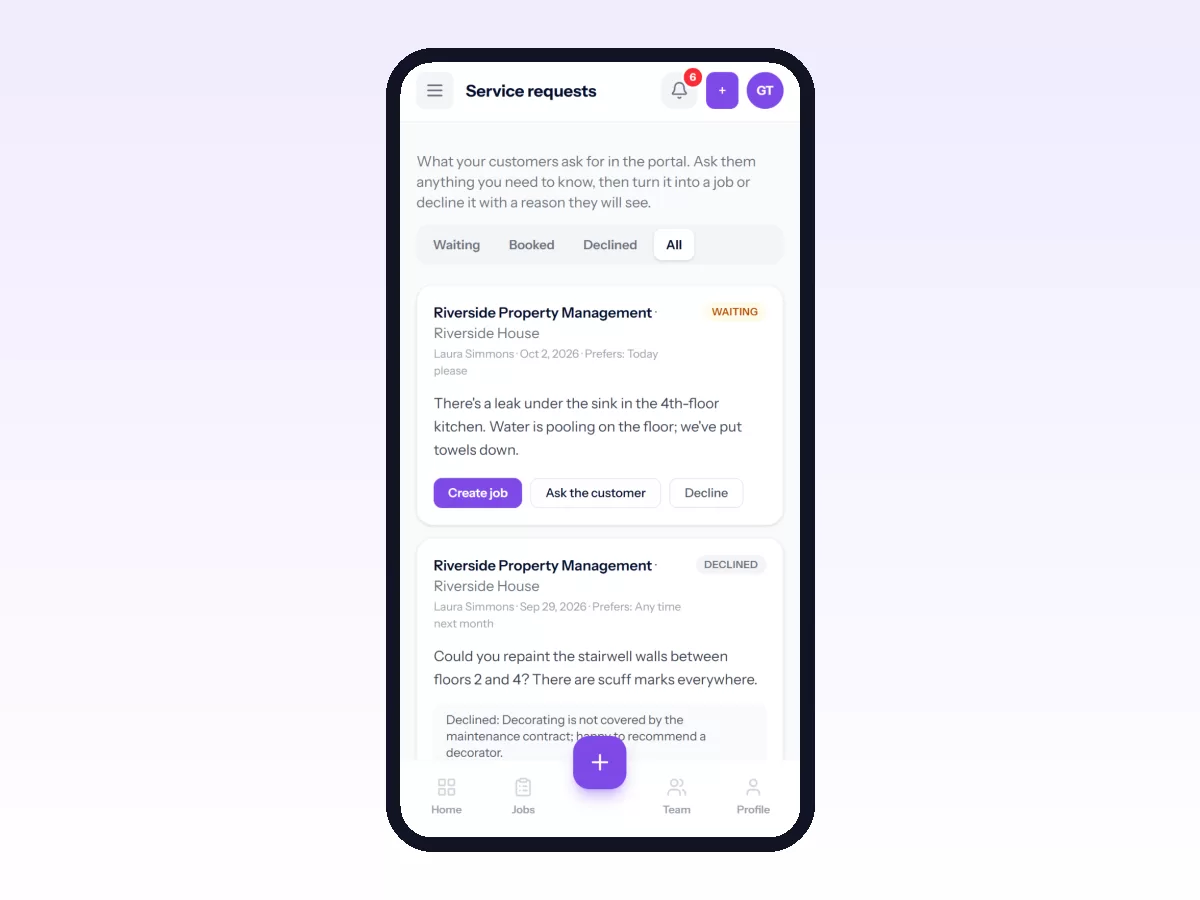
Customers then follow the job in the portal, see the technician's location while they are on the way, view photos and the signature, and approve or reject the finished work. Sites hold access notes for the technician, and recurring jobs handle planned maintenance in the same system.
Everyone who handles requests gets a notification when a new one comes in, and Operations → Service requests shows how many are waiting. The customer is told when their request is booked, or why it was declined.
Related reading: service request management, the customer portal for field service and facility workforce management. Or start free.
Related: Building Maintenance Management for Field Teams · How to Share Job Progress With Customers