Field Force Tracking Software: What It Should Record
Good field force tracking records a few moments that matter rather than watching dots on a map. What the software should record, what it should leave alone, and how to roll it out while keeping your team's trust.
Field force tracking software tells you where your people are and what they did while working away from the office. If you buy it for the wrong reason you end up with a map nobody opens and a team that resents it. Bought for the right reason, it settles disputes, speeds up dispatch and makes attendance honest.
What you actually need to know
Most managers who ask for "tracking" want answers to four questions:
- Did they start work, and where? That means attendance with a location, rather than a text message saying "reached".
- Did they go to the job? Compare where the person was when they started it with where the site is.
- Where is everyone right now? You need this to dispatch the next job or answer a customer.
- What did they do there? That is the job record: notes, checklist, photos, sign-off.
Only the third needs live location. The other three need events recorded at the right moments, which is more reliable and far less intrusive than a continuous trail.
Events beat trails
A continuous GPS trail looks thorough, but it takes a long time to review and is easy to argue with. Nobody reads eight hours of breadcrumbs. Questions get settled by a small number of stamped events: clocked in here at 8:52, started the job 40 metres from the site at 10:15, completed at 11:30.
Look for software that records location, time and GPS accuracy at each of those moments and works out the distance from the site for you. A list of visits that began far from the site is more useful than any map.
Live location, with limits
Live location is worth having for dispatch, to see who is nearest to an urgent job or whether the technician really is on the way. Set clear limits on it:
- Share it only during working time, never in the evening or on days off.
- The company decides whether it is required, optional or off, and staff can see which applies.
- Use it to run the day, not to police every stop.
Staff accept tracking they understand, so write down what is recorded and why before you switch it on.
Questions to ask vendors
- What is recorded at clock-in, and at the start of a job?
- Can you see how far from the site a visit began, and is GPS accuracy taken into account?
- Is location ever recorded outside working time?
- Does clock-in work without signal, and keep the real time?
- Can the office see the job record as well as the location?
Rolling it out
Tell people before the first day. Explain that the aim is fewer phone calls and fewer disputes about hours. Start with attendance and job check-ins, and add live location once people are used to it. Review flagged visits weekly, and when you talk to people, talk about patterns rather than single events.
In Movtro
In Movtro, staff clock in and out on the phone, and the location and GPS accuracy of each are recorded, including when clocking in without signal. When a job goes into progress, Movtro records where the person was and how far that was from the site. Visits that began well away from the site show up flagged for the office.
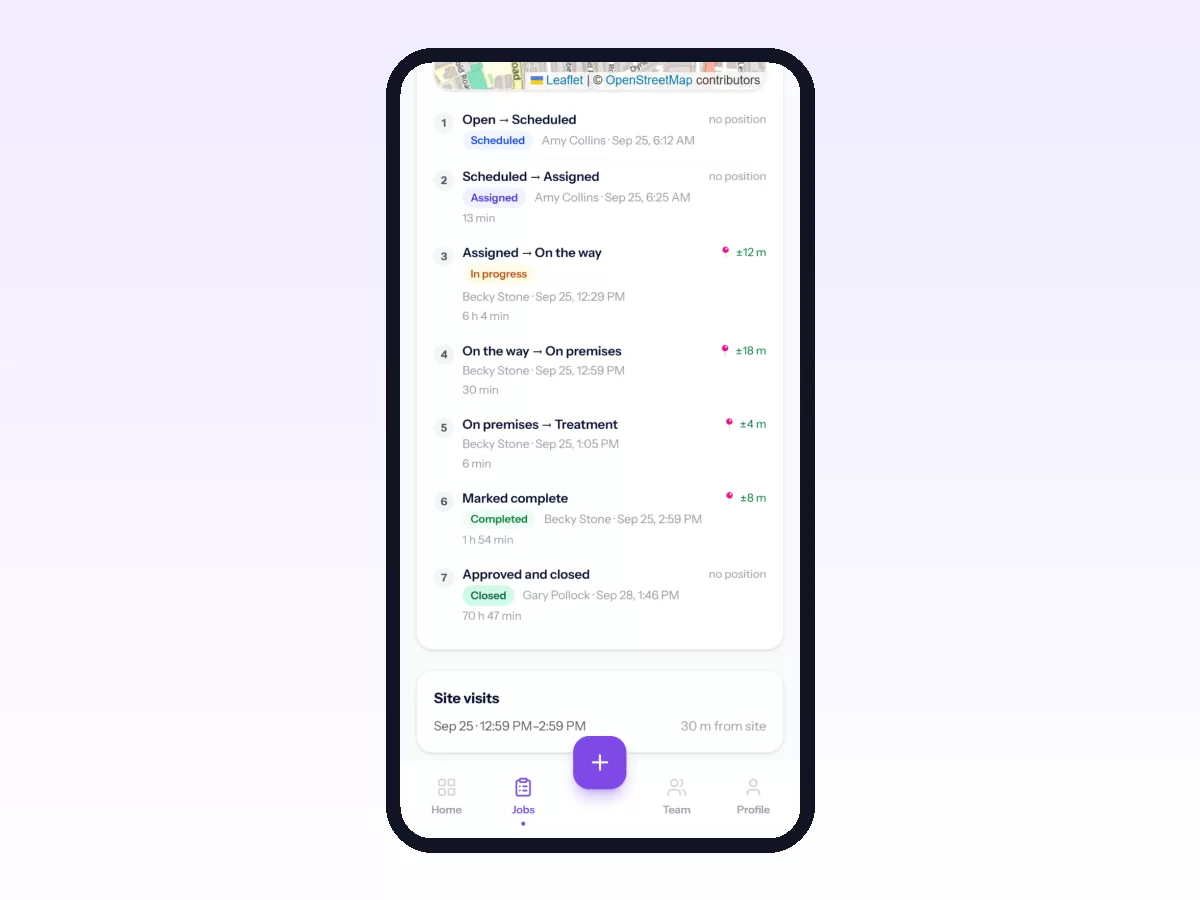
Live location is an organisation setting (required, optional or off) and is shared only while the person is clocked in. The office sees each person's latest position on the map. For people using the Android app it also sees the route they took during their shift, recorded at an interval the organisation sets and kept for 90 days. Movtro does not track outside working time and does not detect arrival automatically.
Related reading: how to track field employees, technician tracking software and field visit tracking. Or start free.