How to Track Field Employees Without Losing Their Trust
Attendance, on-site check-ins and live location: what to track, what to leave alone, and how to set a policy your field staff will accept.
Sooner or later every business with a field team asks how to know where its people are and whether the work is getting done. You can track almost anything. The teams that get the most reliable information are the ones that track the least they need and explain why.
Badly handled tracking leads to resentment, phones left in the van and data nobody trusts. Handled well, it protects the employee as much as the business.
Decide what question you are answering
"Tracking" covers several separate questions. Answer each with the lightest tool that works.
| Question | What answers it |
|---|---|
| Did they start and finish work on time? | Clock-in and clock-out, with location |
| Did they actually go to the job? | A check-in at the job, compared with the site's location |
| How long did the job take? | When the job started and finished |
| Where is everyone right now? | Live location, during working hours only |
| Did the work get done properly? | Checklists, photos, notes and the customer's signature |
Only one of those needs live location. Most of what managers want to know comes from things the employee records anyway: clocking in, starting a job and finishing it.
The four layers
1. Attendance
Everything else builds on this. The employee clocks in and out on their phone, and the location is recorded each time. That on its own answers "did they turn up, and when?" It protects the employee too, because a disputed day has a record. See field employee attendance tracking.
2. On-site check-ins
When a technician starts a job, record where they were and compare it with the site. A visit started forty metres from the site is normal; one started two kilometres away is worth a conversation. For most businesses this is the most useful check they can add, and it asks nothing extra of the employee.
3. Live location
Live location helps dispatch send the nearest person to an urgent job or tell a customer how far away the technician is. People are also most uneasy about it, so think it through:
- Use it only during working time, never after they clock out.
- Tell people exactly when it is on and why.
- Consider whether it needs to be required, or whether optional is enough for your work.
4. Evidence of the work
Checklists, photos, notes and signatures show the quality of the work. Employees resist this layer least, because it proves what they did.
Rules that keep trust
Explain the reason before you switch anything on. "We record where you clock in so a customer can't claim you never came" goes down very differently from silence followed by a new app.
Track during working time only. Once tracking spills into evenings and weekends, you lose trust, and cooperation goes with it.
Use the data for the reason you gave. If you said location is for dispatch, do not start using it to question lunch breaks.
Allow for bad GPS. Phones indoors, in basements and in plant rooms can report positions hundreds of metres out. A system that flags people over a poor reading will be distrusted and gamed, so judge each reading against its own margin of error.
Look at patterns over single readings. One odd check-in is noise. The same technician starting jobs far from site every week is worth discussing.
Let people see their own record. Employees who can see their own attendance and visits dispute far less.
Legal and practical basics
Rules on employee monitoring vary by country, so check what applies where you operate. In most places the safe approach is the same: tell employees in writing what is recorded, when and why; limit it to working time; keep it only as long as you need it; and restrict who can see it.
Mistakes to avoid
- Starting with live tracking. Start with attendance and job check-ins, which are usually all you need.
- Surprising people. A policy announced after the software is installed looks like a trap.
- Treating technology as the whole answer. If you do not trust someone, a map will not fix that.
- Collecting data nobody reviews. It brings risk and resentment and no benefit.
In Movtro
In Movtro, field staff clock in and out on their phone, and the location and GPS accuracy are recorded each time. Lateness is calculated against each person's working hours, and reminders go out when someone forgets to clock in or out. Clocking in works without signal too and keeps the time it was made.
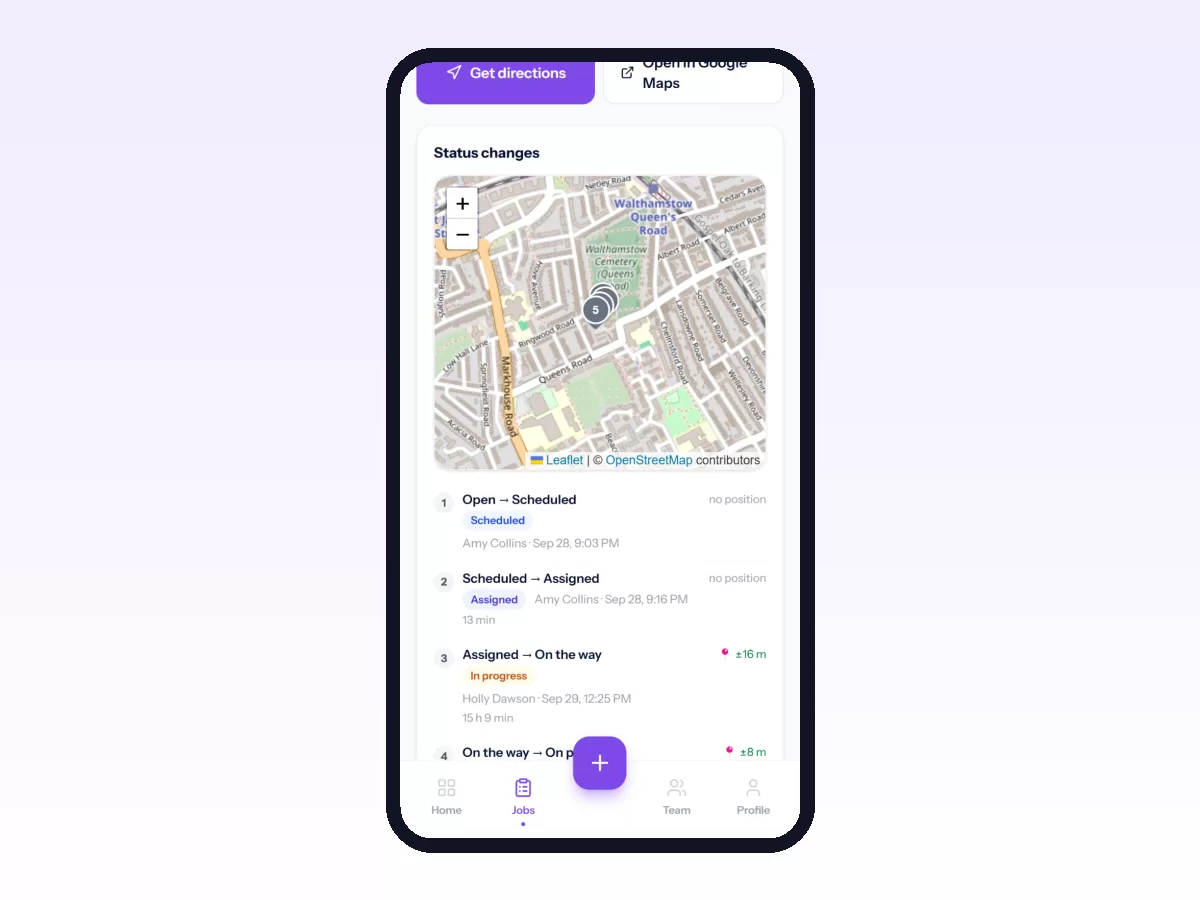
When a technician starts a job, the visit records where they were and how far that was from the site, allowing for the phone's own margin of error, and the office sees a flag on visits that started well away from the site. A stage in your job workflow can also require the technician to be within a set distance of the site before the job can move into it.
Each organisation chooses whether live location is required, optional or off, and it is shared only while the person is clocked in. In the Android app the route is recorded during the shift so a manager can look back at a day; recording stops at clock-out, and routes are kept for 90 days. Movtro does not track people in the background outside working time, and it does not detect arrival automatically. Location is recorded when people clock in, start a job or share it live.
For the team side of this, see what field workforce management covers, or start free.
Related: Field Force Tracking Software: What It Should Record · How to Track Sales Reps in the Field · Delivery Driver Attendance and Location Tracking · How to See Your Team on the Live Map