Field Employee Attendance Tracking: Clock-Ins That Hold Up
Attendance for staff who never see an office: clock-ins checked against location, breaks, lateness and overtime, and a reminder when someone forgets.
Attendance is simple when everyone walks through the same door. A field team might start the day at a customer's site, on a construction project or at their own front door. A register by the office entrance doesn't work for them, and nor does a biometric machine at a depot they visit once a week.
So field attendance has to happen on the phone, and the job is to make a phone clock-in as trustworthy as a machine without turning it into a chore.
What field attendance needs to capture
- Clock-in and clock-out, with the time and where the person was.
- Breaks, so worked time really is worked time.
- Lateness, judged against each person's own working hours instead of one rule for everyone.
- Overtime, calculated from your policy so nobody argues about it at month end.
- Missed clock-outs, spotted the same day instead of at payroll.
Location: the difference between a clock-in and a claim
A button that says "I'm here" is only a claim. A clock-in that records where the phone was, and how accurate that reading was, is evidence.
Two practical points follow.
GPS accuracy varies. Outdoors, a phone might be accurate to ten metres. Indoors, in a basement or a plant room, it can be out by several hundred. A good system records the accuracy with the position so a poor reading isn't taken as someone being in the wrong place.
Decide whether location is required. For most field teams, asking for a location at clock-in is reasonable and people accept it. If someone really can't get a fix, they should be told why the clock-in didn't go through, instead of the system quietly saving it with no location.
On the wider question of how much to track, see how to track field employees without losing their trust.
Set the rules before you switch it on
Attendance arguments nearly always come down to rules nobody wrote down. Settle these first:
- Standard working time per day. Anything above it counts as overtime, if you pay overtime at all.
- A grace period. Is 9:04 late? Choose a tolerance and apply it to everyone.
- Working days and hours for each person. A technician who works Tuesday to Saturday shouldn't be marked late on Monday.
- Who hears about lateness and missed clock-ins: the person's supervisor, HR, or both.
- Who can correct a record, with every correction logged.
Then tell the team in writing before the first day.
Expect no signal
Field staff often start work somewhere without signal: a basement car park, a remote site, the middle of a warehouse. If the app won't clock in without a connection, people wait until they find signal, and the clock-in time is off by however long that took.
An offline clock-in should keep the time it was actually made and send itself once the signal comes back. The record should also show that it arrived late, so a supervisor can tell the two apart.
Remind people instead of reprimanding them
People arriving late is a smaller problem than people forgetting to clock out, which leaves a shift that "lasted" nineteen hours sitting in payroll.
Send a reminder when someone hasn't clocked in by their start time or hasn't clocked out at the end of their day. That sorts out most of these on the same day, while the person still remembers when they left.
From attendance to payroll
Attendance pays off only when it reaches payroll without anyone retyping it. Worked time, overtime, lateness, approved leave and holidays come together into one figure per person, and HR checks and approves it before it affects pay. See time and attendance for field teams: clock-in to payroll.
Mistakes to avoid
- Inventing rules after the fact. Agree them before the first clock-in.
- Treating every poor GPS reading as a lie. Judge the position against its accuracy.
- Finding missed clock-outs at month end. Send reminders on the day.
- Letting anyone edit anyone's record without a trace. Allow corrections and log them.
In Movtro
Field staff clock in and out on the Movtro app, with breaks, and Movtro records the location and GPS accuracy of each. Your organisation decides whether clocking in requires a location. Lateness is measured against each person's working days and hours plus a grace period you set, and overtime against your standard working time.
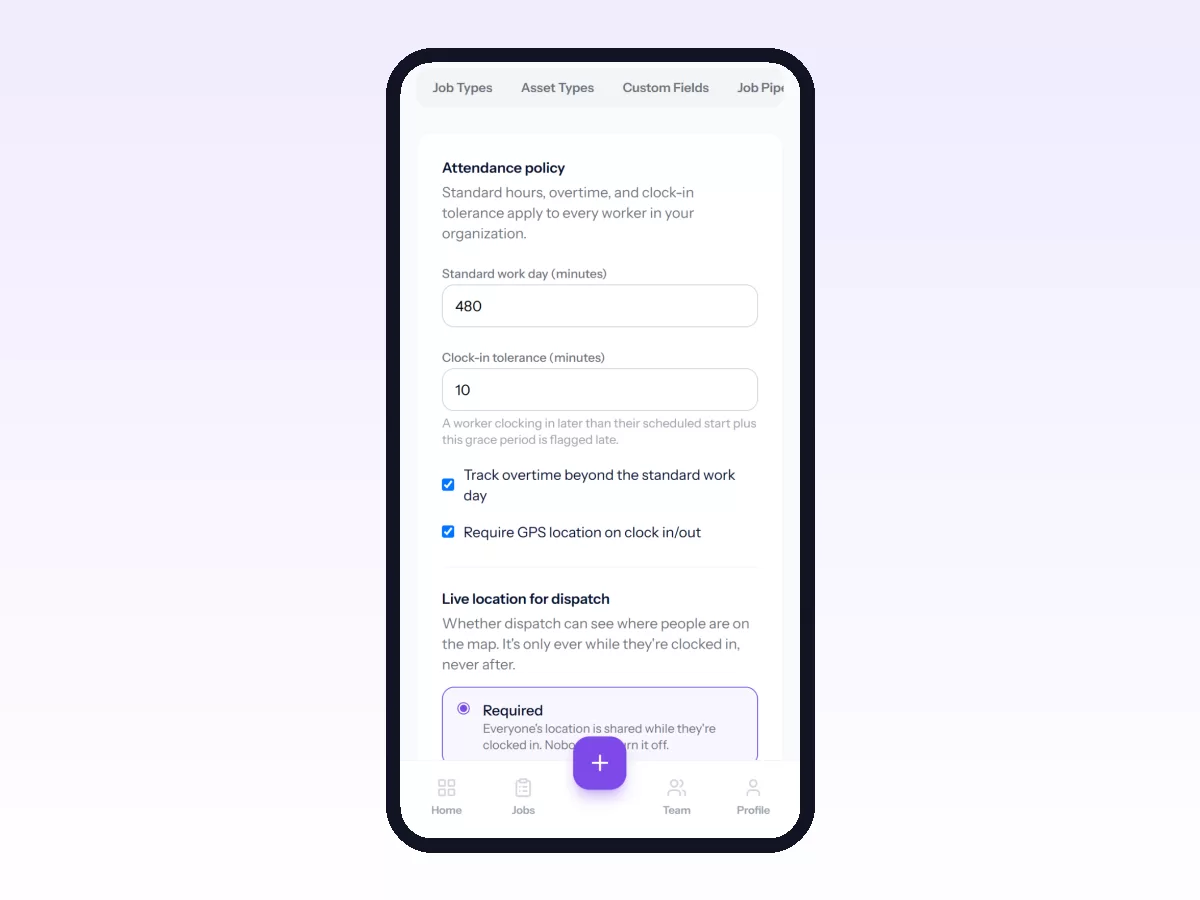
When someone is late or hasn't clocked in or out, Movtro notifies them and the managers or HR people you pick. Clocking in and out works without signal too: the phone keeps the time it was done and sends it when the connection returns. Supervisors see their team's attendance, and a manager with permission can clock out someone who forgot. Attendance feeds the HR module's payroll, where HR reviews worked time, overtime and absences, adjusts them with a note where needed, and approves them before pay is calculated.
Start free, or see what field workforce management covers.
Related: Payroll for Field Staff: Paying From Real Attendance · Construction Site Attendance Tracking · Cleaning Staff Attendance and Job Tracking · Field Force Automation: What to Automate First · How to Set Up the Attendance Policy · How Clock-In and Clock-Out Work, Including Offline