Time and Attendance for Field Teams: Clock-In to Payroll
Attendance, job time and travel time answer different questions. How to capture all three once, set overtime policy on purpose, and get to payroll without re-typing anything.
Time tracking for field teams has a problem office time tracking does not: there is no door to badge through. A technician starts the day at one customer site, finishes at another, and may not see the office for a week. Overtime, payroll and job costing all depend on recording that time honestly.
Attendance works on every plan; payroll and payslips come with the Operations + People plan.
What you are actually trying to capture
Three different things get muddled under "time tracking", and each answers a different question.
Attendance tells you whether this person was working today, and for how long. It feeds payroll and leave.
Job time is how long a specific job took. It feeds quoting, scheduling accuracy and customer billing.
Travel time is the time on the road between jobs. It is paid, usually not billable, and routinely invisible.
If a system captures only attendance, you get payroll but no costing. If it captures only job time, you get costing and an argument with your team about unpaid travel. You want all three, recorded once rather than three times.
Clock-in that technicians will actually use
Adoption depends on a few rules.
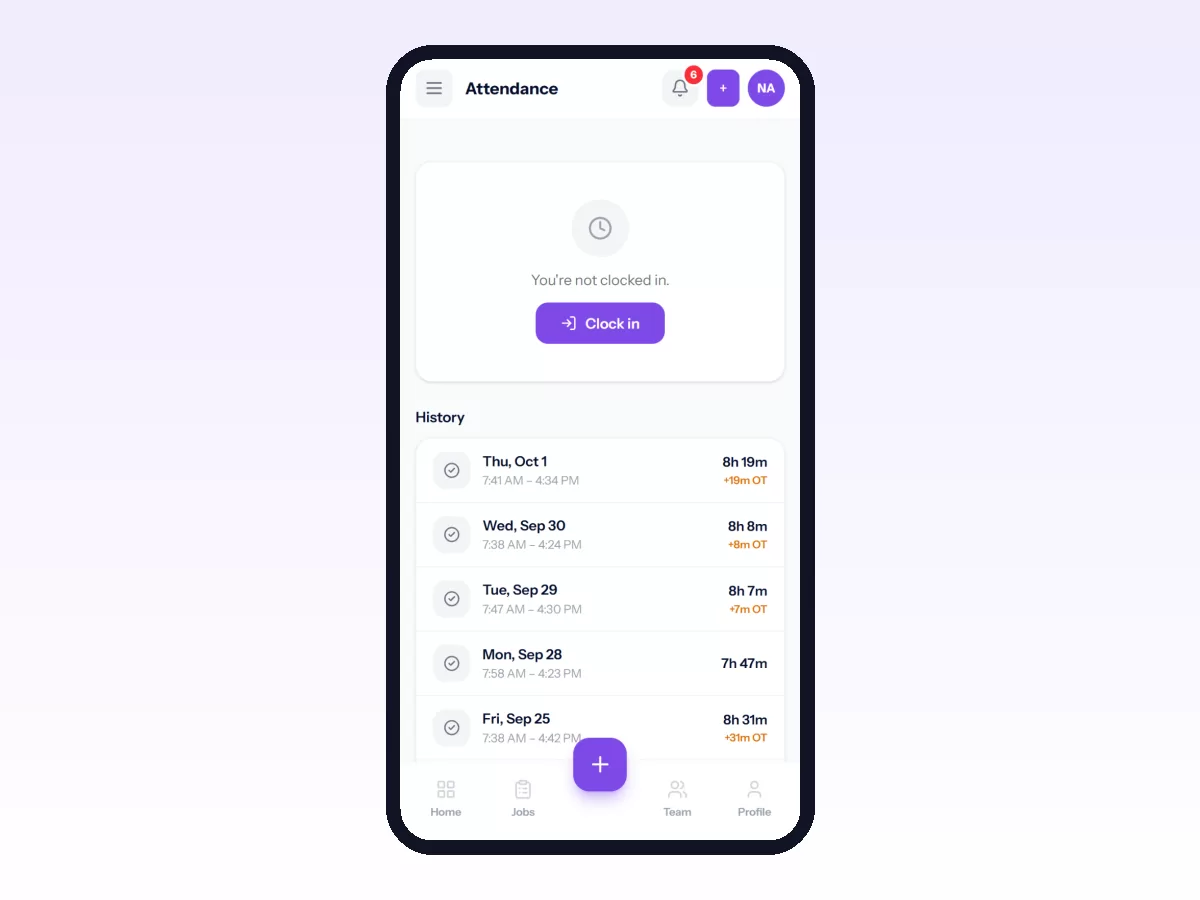
It takes one tap, from wherever they are. If clocking in means opening a second app or being at a set location, it will happen late, in batches and from memory, and remembered times are wrong.
The state is visible. The technician should see at a glance that they are clocked in. Most missing clock-outs come from someone who thought they had already done it, not from dishonesty.
Breaks are recorded explicitly. If your rules deduct an unpaid break, the system should record the break instead of silently subtracting it. Silent deductions are how people stop trusting the numbers.
Mistakes can be corrected, with a trail. People forget. A visible, logged and approved way to fix yesterday is better than a rigid system that people get round by writing times on paper.
Overtime is a policy decision first
Before you configure anything, decide and write down:
- What counts as a standard day, and which days are working days.
- When overtime starts: after a daily threshold, a weekly one, or both.
- What multiplier applies, and whether it differs at weekends or on holidays.
- Whether travel outside working hours is paid, and at what rate.
- Who approves overtime, and whether approval comes before or after it is worked.
Then configure the software to match the policy. If you let the software's defaults become the policy by accident, you may find out a year later that you have been paying the wrong amounts.
Connecting attendance to payroll without double entry
The usual failure is familiar. Attendance lives in one system and payroll in a spreadsheet, and someone spends the last three days of every month retyping. Retyping introduces errors and hides them, because nobody re-checks a number they just typed.
A connected flow looks like this:
- Technicians clock in and out through the working month.
- At period close, worked hours, overtime, approved leave and public holidays are pulled together per person.
- A person reviews the summary. Do not skip this: payroll built from unreviewed field data will be wrong in both directions.
- The approved figures feed the payroll run alongside salary, allowances, deductions, reimbursements and any advance repayments.
- The period is locked, payslips are issued, and the numbers stop changing.
Locking matters more than it sounds. If a payroll period can still be edited after payslips go out, you cannot reconcile it.
The checks worth running every month
- Missing clock-outs. A handful is normal; a pattern means the clock-out step is too hard.
- Days with attendance but no job activity, and the reverse. Both mean something was recorded in the wrong place.
- Overtime concentrated on a few people. This is usually a dispatch pattern rather than a staffing shortage, and it is a reliable predictor of who resigns next.
- The gap between scheduled and actual job duration. It shows how far your estimates are off, and where.
How Movtro handles it
Technicians clock in and out on their phone. Breaks, worked duration, overtime and late arrivals are recorded against work-hour and break rules you configure. That attendance feeds the payroll period as a snapshot HR can review. It is computed from closed attendance records, approved leave and holidays, and HR can adjust it before approving, with the adjustment recorded.
From there a payroll run covers base salary, recurring and one-off allowances and deductions, overtime, expense reimbursements, advance repayments and a manually configured tax deduction, then locks and issues payslips. Movtro deliberately does not calculate statutory tax brackets or file returns; you configure the tax deductions yourself.
Leave, holidays, expenses and advances live in the same place, so the figures that reach payroll are the ones your team actually recorded, not a re-keyed copy.
Related: Payroll for Field Staff: Paying From Real Attendance · Field Employee Expenses, Reimbursements and Advances · Leave Management for Field Teams · How to Run Payroll and Send Payslips