Driver Shifts, Hours and Live Location for Small Delivery Fleets
Treat the driver's shift as the boundary: clock in, record the route while they work, stop at clock-out. How a small fleet can get hours and location right and keep it fair.
Small delivery and haulage companies want two things from their drivers' phones: an honest record of the hours worked, and a view of where drivers are during the day. Most get neither cleanly. Hours come from a sheet filled in on Friday. Location comes from ringing the driver, or from a vehicle tracker that doesn't know who was driving or whether they were on shift.
This article explains one principle, that the shift is the boundary, and how to run hours and location around it. For the basics, see delivery driver attendance and location tracking and the delivery and courier page.
The shift is the boundary
For a small fleet the cleanest rule is that a driver's location is recorded while they are clocked in and not at all after they clock out. It's easy to explain and easy to check, and it ties location to paid working time instead of to the person.
It also answers the first thing every driver asks: "Are you tracking me at the weekend?" The answer is no, unless they are working a shift.
Clock-in: where the day starts
A driver clocks in on their phone when they start work. That might be at the depot, at the first collection, or at home if they take the vehicle home. Decide which applies and write it down.
At clock-in, record:
- The time, which starts the paid day.
- The place, with the phone's accuracy, if your policy requires a location.
- Whether they were late, measured against that driver's own start time plus a grace period so that five minutes of traffic doesn't count against them.
If drivers should start at the depot, make the depot their work location. You can then flag or refuse a clock-in made anywhere else, instead of finding out later.
During the shift: live position and the recorded route
Once a driver is clocked in, two separate things can help:
- Live position, for dispatch: who is closest to an urgent collection, who is running late, whether a driver has left the last drop.
- The recorded route, for afterwards: where a driver actually went that day, when you get a customer query, a late delivery or a disputed hours claim.
Decide who can see each. Usually that is the owner, the transport manager and the dispatcher, with a supervisor seeing only their own drivers. When a phone goes quiet, look at the driver's jobs for that period before you draw conclusions. Dead zones and flat batteries are common.
Clock-out: where the day ends
Clock-out ends both the paid day and the tracking. Hours worked are the time between clock-in and clock-out, minus breaks, and anything beyond the standard day is overtime. Two problems are worth catching automatically:
- A forgotten clock-in, so a driver who started at 6am doesn't show as starting at 9am.
- A forgotten clock-out, so a driver doesn't show as working until midnight.
Usually a reminder to the driver sorts out both.
Hours for pay, not for driving-time rules
Clock-in and clock-out record working time for attendance and pay. They are not a legal record of driving time. Where drivers' hours rules apply, such as tachographs in the UK and EU or ELDs in the US, the regulated device stays the record for compliance and attendance software runs alongside it.
Introduce it fairly
Drivers accept tracking when you explain it before you switch it on:
- Say what is recorded: clock-in and clock-out times and places, and position and route during the shift.
- Say what isn't: anything outside the shift.
- Say who can see it and how long routes are kept.
- Say what it's for: dispatch, customer questions, fair pay for overtime, and settling disputes, which go the driver's way as often as not.
- Let drivers see their own record.
How it works in Movtro
Drivers clock in and out from the dashboard or the attendance screen, in the web app or the Android app. If your policy requires it, each clock-in and clock-out records the phone's location and its accuracy. A clock-in made without signal is saved on the phone with the real time and sent when the phone reconnects, up to seven days later. Lateness is judged against each person's working hours for that day plus your grace period. Breaks come off worked time, and time beyond your standard work day counts as overtime.
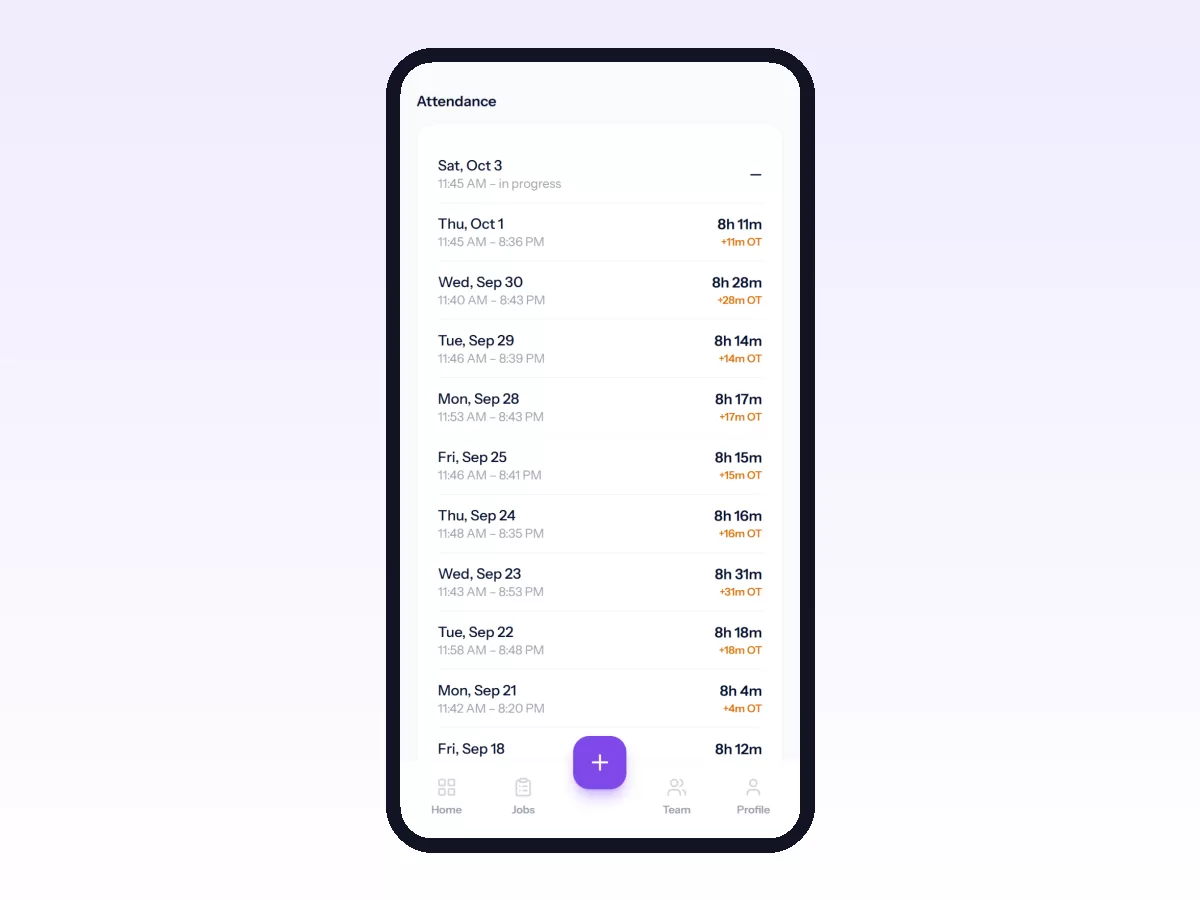
For depot clock-ins, assign drivers to one or more work locations. Your attendance policy then decides what happens when someone clocks in away from all of them: nothing, a flag on the record with a note to the people you choose, or a refusal.
Movtro can send reminders to people who haven't clocked in a set number of minutes after their start time, and to anyone still clocked in after their end time. The managers or supervisors you name are told too.
Live location is a company setting. In the attendance settings you pick one of three options: off, each person decides, or required while clocked in. Movtro accepts location only while the person has an open shift.
The Android app records routes. While a driver is clocked in and sharing, it records their route, even with the screen off, at an interval you set (anywhere from every 15 seconds to every 10 minutes) and with a minimum distance between points. The clock card tells the driver that their location is being shared for work and until what time. Tracking stops at clock-out, and routes are kept for 90 days. On other phones the web app can share the latest position while it is open, but it can't record a route in the background.
Managers get a team map showing each clocked-in driver's latest position, marked active or stale, and when each person was last seen. Tap a driver to see the route recorded on any day. If the app has sent nothing for more than 15 minutes during an open shift, the driver is marked Tracking interrupted. A job page shows the route the driver's phone recorded while that job was being worked, and the distance driven. For a load with pickup and delivery stops, that distance is split into empty (to the pickup) and loaded (from the pickup to the last delivery). People with access to the whole team see everyone; a supervisor without that access sees only their direct reports.
Drivers can open My Route to see their own planned stops and the route their phone recorded that day.
Customers with portal access see the driver's position only for their own job and only while it is in a travelling stage. If you turn it on, they can also get a "nearly there" message when the driver's phone comes within your chosen distance of their site. The message gives the driver's first name only.
Worked minutes, overtime and late days feed the workforce report. If you use Movtro's payroll, HR approves attendance inputs before each payroll run. Drivers can claim fuel, parking and tolls with receipts and link them to a job. See payroll for field staff.
Movtro is not vehicle telematics and does not record driving hours for compliance. The route comes from the driver's phone during their shift, not from the vehicle.
Related reading: how to track field employees without losing their trust, how to see your team on the live map and daily dispatch for a small fleet. Or start free.
Frequently asked questions
Does Movtro track drivers outside working hours?
No. Movtro accepts location only while a driver is clocked in, and only if your company setting allows it. The Android app stops recording at clock-out.
Can I see where a driver went yesterday?
Yes, as long as the driver uses the Android app and was sharing location during their shift. On the team map, tap the driver and pick the day to see their recorded route. Routes are kept for 90 days.
What does "tracking interrupted" mean?
The driver is clocked in and the Android app was tracking, but no location has come in for more than 15 minutes. The usual causes are a dead zone, a flat battery or location switched off on the phone. Check the driver's jobs for that period before drawing conclusions.
Can Movtro's clock-in hours be used for drivers' hours compliance?
No. They are attendance and pay records. Where tachograph or ELD rules apply, keep using the regulated device for compliance and use Movtro for shifts, pay and the day's work.