Why Offline Mode Is Non-Negotiable for Field Software
A field app that only works online fails in basements, and it also swaps accurate records for remembered ones, which weakens every report you run.
Field service software is bought in offices with reliable wifi and used in plant rooms, basements, lift shafts, rural sites and underground car parks. Because of that gap, offline capability decides whether your data is any good, which makes it much more than one more feature on a checklist.
What happens when the app needs a signal
Watch what a technician does when the app will not load:
- They do the work.
- They write notes on their phone, on paper, or not at all.
- They enter it later, in the van, at home, or on Friday for the whole week.
The damage happens at step three. Times recorded from memory are wrong. Photos taken "to upload later" never get matched to the right job. Checklists filled in at the end of the week describe what usually happens instead of what did. Status changes arrive in a batch, so the office spent the day without knowing what was going on.
No data was lost as such. The system swapped accurate data for remembered data, and in a report the two look exactly the same.
What real offline support means
Some systems claim to work offline when all they do is cache a read-only list. The fair test is whether a technician can complete a whole visit from start to finish with the phone in airplane mode:
- Open their assigned jobs, with the site details, access notes, equipment and history already on the device.
- Change the job status: start, hold, complete.
- Fill in the checklist, including required fields.
- Add notes and take photos, attached to the right job.
- Record parts used.
- Capture a customer signature.
- Clock in and out.
Then they reconnect, and all of it syncs without the technician doing anything.
If any of those steps needs a connection, technicians will find out at the worst possible moment and stop trusting the whole tool. Partial offline support can be worse than none, because nobody knows which half they can rely on.
Conflicts are the hard part
Storing data locally is easy. The engineering problem is what happens when two versions of events meet.
A technician marks a job complete at 14:00 while offline. At 14:30 a dispatcher, seeing no update, reassigns it. At 15:00 the technician's phone reconnects. Which change wins?
No single answer is right every time, but one answer is wrong: quietly picking a side and throwing the other away. A system you can trust will:
- Keep an ordered queue of the operations made offline, instead of a single snapshot of the final state.
- Detect that the state on the server changed in the meantime.
- Resolve what it safely can, and show what it cannot.
- Never drop a technician's work without telling them.
That last point matters most. A technician who loses an hour of completed checklists once will keep a paper backup for good, and you are back on paper with extra steps.
Questions worth asking a vendor
- Can a technician complete a full visit with no connection at all? Ask to see a demo in airplane mode instead of a description of one.
- How many days of assigned work are cached, and what happens on day four of a rural run?
- Are photos queued at full quality, or dropped when storage runs low?
- What happens if the same job is edited in the office and in the field while the phone is offline?
- Can a technician see what is still waiting to sync?
People underestimate that last question. When technicians can see the sync state, they trust the app. When they cannot, they screenshot everything.
The operational payoff
Offline support is usually justified by continuity, because work carries on when the signal drops. That is true, but the bigger return is data quality.
When the work is recorded as it happens, times are actual instead of estimated, photos attach to the right job, checklists show what was found, and parts are recorded while the technician is looking at the part. Every number built on that data, such as job costing, duration estimates, first-time fix rate and stock planning, is accurate as a result.
A system that only works online fails in basements, and it also makes every report you run less reliable.
In Movtro
Movtro keeps assigned jobs on the device. With no signal, a technician can move a job through its stages, put it on hold, resume, complete or cancel it, report a problem, answer every kind of checklist question (a reading outside its range still reports a problem on the job when it syncs), add notes, attach photos, and clock in and out. These changes wait in a queue on the phone, in order, and sync when the connection returns. A visible sync status means nobody has to wonder whether the work was saved. If someone in the office changed the same job in the meantime, the phone's change is held back as a conflict for the technician to review, so it does not overwrite the office's. Clock-ins and clock-outs keep the time they were made, not the time they synced.
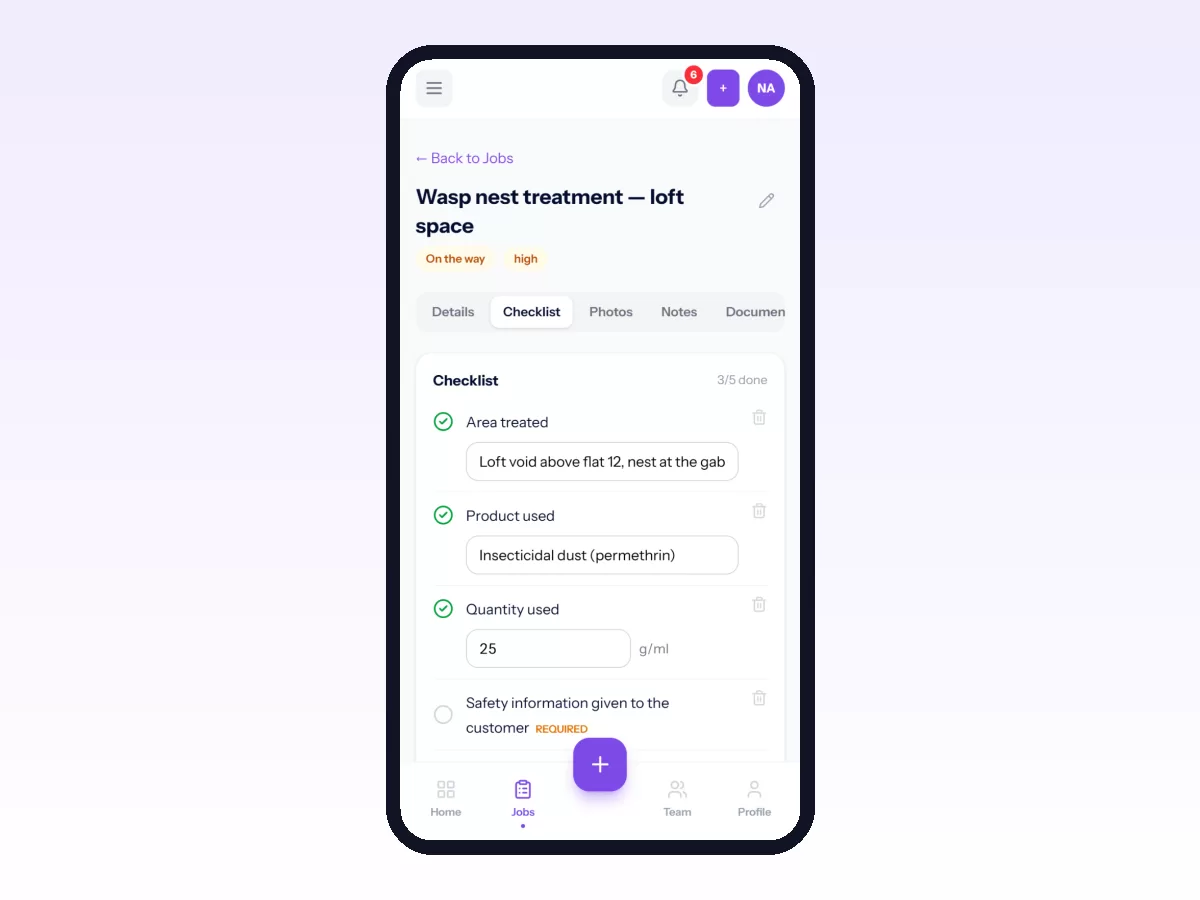
The parts that do need a connection (live dispatch, messaging, the customer portal) are the ones whose whole purpose is being connected. The work itself does not need one.
For the wider picture, see our practical guide to field service management software.
Related: Mobile Field Service App: What Technicians Actually Need · How Clock-In and Clock-Out Work, Including Offline · How Technicians Check In on Site and Complete a Job · Troubleshooting Location, Notifications and Sync · Getting Movtro on Your Phone and Working Offline