Movtro Now Includes a Complete HR Module for Field Teams
Employee records, leave, expenses, advances, payroll and payslips now sit next to jobs, dispatch and attendance, so the hours your team works in the field reach HR without anyone re-typing them.
Most field service companies run two systems that never talk to each other. One tells you where your technicians are and which jobs they finished. The other, often a spreadsheet and sometimes an accountant's inbox, decides what those same people get paid, how much leave they have left, and whether last month's fuel receipts were ever reimbursed.
The arguments start in the gap between the two: overtime nobody can prove, leave approved on WhatsApp and forgotten by payroll, an advance deducted twice or not at all.
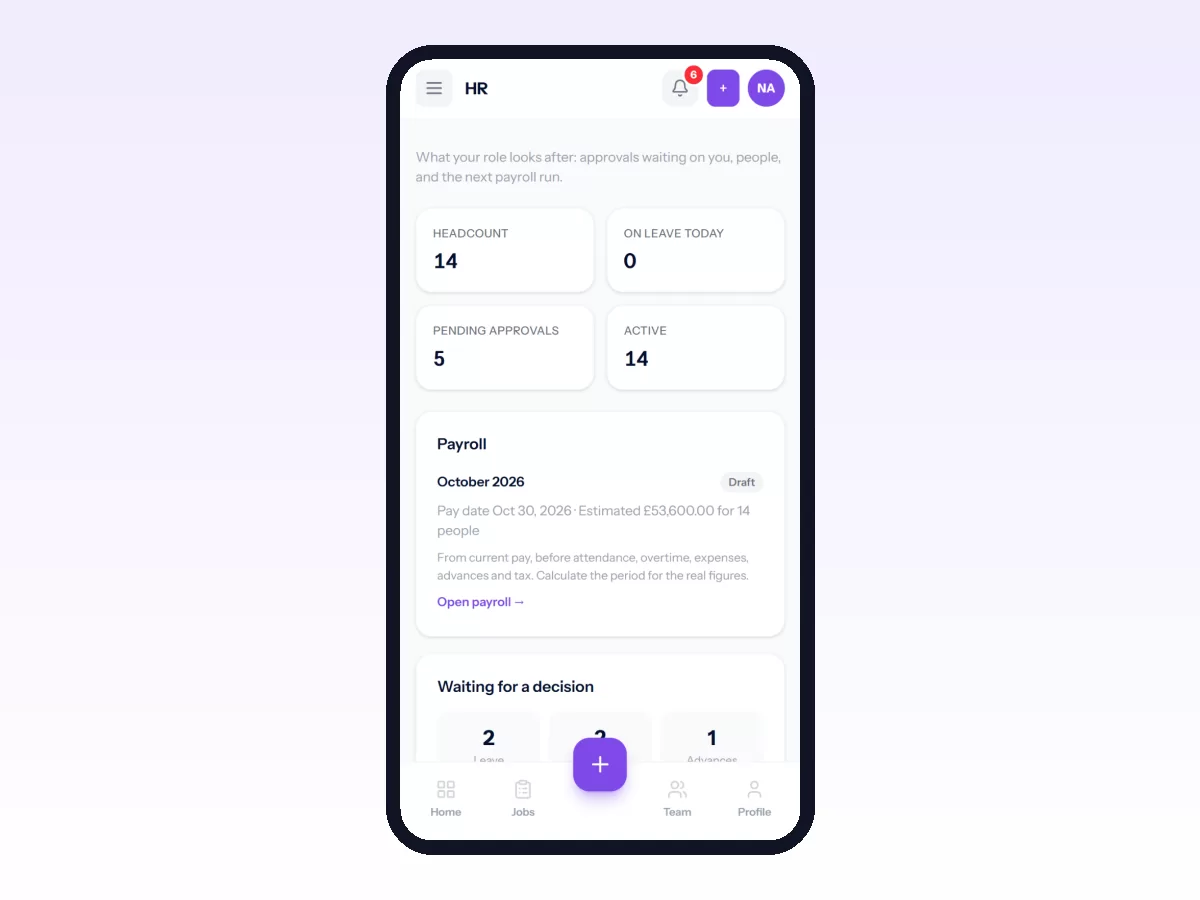
Movtro now covers both sides. Alongside jobs, dispatch, the live map and attendance, it has an HR module. Employee records, leave, holidays, announcements and HR documents come with every Movtro account. Payroll with payslips, salary advances and expenses come with the Operations + People plan. All of it uses the same people, the same clock-ins and the same app your team already has.
Why HR belongs next to field work
In an office, HR can run on its own. For a field team it can't, because the facts HR needs are created in the field.
Hours come from the job. When a technician clocks in at a customer site, that record is the evidence for their working day, their overtime and any late arrival. Errors creep in when someone re-types it into a separate HR tool.
Leave has to line up with attendance. When leave is kept in one place and clock-ins in another, an approved day off shows up as an absence and someone loses pay they shouldn't. With both in one system, approved leave is counted as leave automatically.
Expenses happen on the road: fuel, parts bought in an emergency, parking at a client's building. The person spending the money is out at the job, away from any desk.
With HR in the same place, the person who knows the facts records them once, at the moment they happen.
What the HR module includes
Employee records. Every team member gets an HR profile linked to their Movtro account, with department, employment status, emergency contacts and address. Bank details are encrypted and visible only to people with HR permission. Status changes such as leave, suspension, resignation or rehire are recorded with a date and a reason, so the history is always there.
Compensation. Base salary and recurring allowances or deductions each have the date they take effect. When someone gets a raise, the new salary starts on its date and what was paid before stays as it was.
Leave and holidays. You create your own leave types (annual, sick, unpaid, anything you need), set yearly allowances and carry-forward limits, and let people request leave from their phone. Balances update when leave is approved, and requests that overlap or go over the balance are caught before they reach a manager. Public holidays can apply to everyone or to one department, and they are left out of leave and payroll calculations automatically.
Expenses and reimbursements. Field staff submit an expense with a photo of the receipt. It can go straight to HR, or to the employee's supervisor first and then to HR. Approved expenses are paid separately or added to the next payroll, and Movtro makes sure the same expense can never be reimbursed twice.
Salary advances. Employees can request an advance, and HR can approve it and set a monthly instalment. Payroll deducts the instalment automatically until the balance reaches zero.
Payroll and payslips. Payroll runs by month. Movtro gathers each person's salary, allowances, approved overtime, unpaid leave, reimbursements and advance instalments, and shows you every line before anything is final. HR reviews and adjusts, a manager approves, and locking the period issues payslips that employees can open and download as a PDF. If something was wrong, the period can be unlocked with a reason, and every step is recorded.
Announcements. You can post an update to the whole company, a role or a department and ask people to confirm they've read it, then see who has acknowledged it and who hasn't.
HR documents. Contracts, warning letters, salary letters and receipts are stored against the employee, and only HR and the employee concerned can open them.
Reports. Headcount, payroll, leave, expenses and advances, on screen or exported to CSV and PDF.
How it connects to field workforce management
A standalone HR tool can't do this part.
Attendance feeds payroll. Clock-ins and clock-outs already record location and working time. At payroll time, Movtro turns them into worked days, overtime and absences for each employee. HR checks and approves those figures before they affect pay, so nobody's salary depends on a number nobody reviewed.
Late and missed clock-ins reach the right people. Set a grace period, and Movtro notifies HR or the managers you choose when someone arrives late, hasn't clocked in, or forgot to clock out.
Supervisors approve for their own team. A field supervisor sees leave requests and expenses from their direct reports and can approve them on the spot, without seeing anyone else's salary.
Your team uses one app. Technicians already do their jobs in Movtro, and the same app now has a "My HR" area for payslips, leave balances, leave requests, expenses, advances and company announcements.
Roles keep salaries private. There is a dedicated HR Manager role, and permissions decide who can see pay or bank details and who can approve payroll. A dispatcher can plan the week without seeing what anyone earns.
Built for how you actually pay people
Movtro handles the payroll arithmetic, approvals and payslips. It doesn't file taxes for you. Tax is a clear deduction line that HR enters or sets per employee, so it works whatever the rules are where you operate. Amounts are in your company's currency throughout.
Getting started
Employee records and leave work on every account; payroll, advances and expenses need the Operations + People plan. To set it up:
- Open HR Settings (under HR in the menu) and choose your currency, working days and when your leave year starts.
- Add departments and leave types, then your public holidays.
- Create an HR record for each team member and add their salary.
- Give your HR person the HR Manager role: open them under Team → People and change their role.
- Run your first payroll for the current month and review it before you lock it.
Your technicians don't need to do anything new. Their next clock-in already counts, and the My HR area will be waiting in the app.
If you'd like a walkthrough using your own team structure, book a demo or start free.
Related: Payroll for Field Staff: Paying From Real Attendance · Field Employee Expenses, Reimbursements and Advances · Leave Management for Field Teams · Announcements Field Staff Actually Read · How to Run Payroll and Send Payslips · How to Submit and Approve Expenses · How to Request and Approve Leave and Salary Advances