Mobile Workforce Management: A Practical Guide
What mobile workforce management covers, what the phone app has to do when there is no signal, and how to roll it out to a team that already runs on WhatsApp.
A mobile workforce is any team that works on the move: technicians going from job to job, crews on construction sites, cleaners covering several buildings, reps visiting customers. Mobile workforce management is how you organise, support and account for that team when the phone in their pocket is the only screen they have.
The phrase sounds like software, but most of it comes down to decisions about what the phone should ask of people, what it should give them, and what happens when it cannot reach the office.
What the phone has to do
For a field team the phone is the office, so anything that only works on a desktop might as well not exist for them. A mobile setup that works has to cover five things.
1. Tell them what to do next
When the technician opens the app they see today's work in order, with the address, the customer, the job description and any access instructions. The next thing to do should be obvious without scrolling through a list.
2. Let them record the work as they do it
Moving the job on, ticking the checklist, taking photos, adding notes, logging parts and capturing the customer's signature should each take seconds, done with a thumb, standing up, sometimes wearing gloves.
3. Keep working without signal
Basements, plant rooms, rural sites and lifts all lose signal. If the app stops working when the signal drops, technicians give up on it and go back to paper. Everything they do on site has to work offline and send itself when the signal returns. See why offline mode is non-negotiable.
4. Handle attendance
This means clocking in and out, breaks, and the location at each. For many field teams it replaces a punch card or a register at a depot they rarely visit. See field employee attendance tracking.
5. Keep them in touch without the noise
Job updates, reassignments and messages from the office should arrive as notifications. In a group chat, the one message that matters gets buried under forty that do not.
What the office gets back
Each of those actions on the phone gives the office information:
- Progress without phone calls. A job moved to "in progress" means someone is on it.
- Where people are: location at clock-in, at each job, and live during work if you choose to switch that on.
- Evidence, with photos, checklists and signatures attached to the job instead of scattered across personal phones.
- Hours, with attendance reaching payroll without being typed again.
The office should never have to ask a technician for something the phone could have recorded.
Rolling it out to a team that lives on WhatsApp
The software is the easy part of mobile workforce management. Changing habits is harder. Most field teams already coordinate on WhatsApp, and it works well enough that people resist anything new. A rollout that works looks like this.
Start with the people who dispatch. If the office still sends jobs by WhatsApp, technicians will keep reading WhatsApp. Once jobs only arrive in the app, people open the app.
Make the first week about one habit. In week one, every job is opened and closed in the app and nothing else changes. Photos, checklists and parts come in week two.
Pick a respected technician as the first user instead of the most junior one. If the best technician says it is fine, the rest will follow.
Retire the old channel on purpose. Tell the team the date the group chat stops being used for jobs, and stick to it. People can keep it for social chat if they want.
Be honest when people ask why. For technicians, the benefits are fewer phone calls, no paperwork at the end of the day, and proof of the work they did if a customer ever disputes it. Tell them that, instead of talking about management visibility.
For a step-by-step version of the switch, see how to replace Excel and WhatsApp for field operations.
Mistakes to avoid
- Asking for too much data. Every extra field is time the technician is not working, so ask only for what someone will use.
- Tracking people more than you need to. Location during working time, for a clear reason, is accepted. Anything that feels like surveillance meets resistance and is usually undermined. See how to track field employees without losing their trust.
- Forgetting the cheapest phones on the team. Test on the oldest Android handset your team uses, not the manager's.
- Treating the rollout as finished at launch. After two weeks, look at what is being skipped and fix the reason instead of blaming the person.
In Movtro
Movtro's field app runs on Android and in any mobile browser. Technicians see their assigned jobs with the site, access notes and a one-tap route in their maps app. They move jobs through your stages, answer checklists (each step can be a tick, yes/no, a reading, text, a pick-list or a photo), add notes and photos, log parts and capture signatures. Without signal they can still move jobs on, complete them, add notes and photos, answer checklist questions, and clock in and out. Everything waits on the phone in order and syncs when the signal returns, with a clear sync status. If someone in the office changed the same job in the meantime, the technician's change is held back for them to review so it does not overwrite the office's.
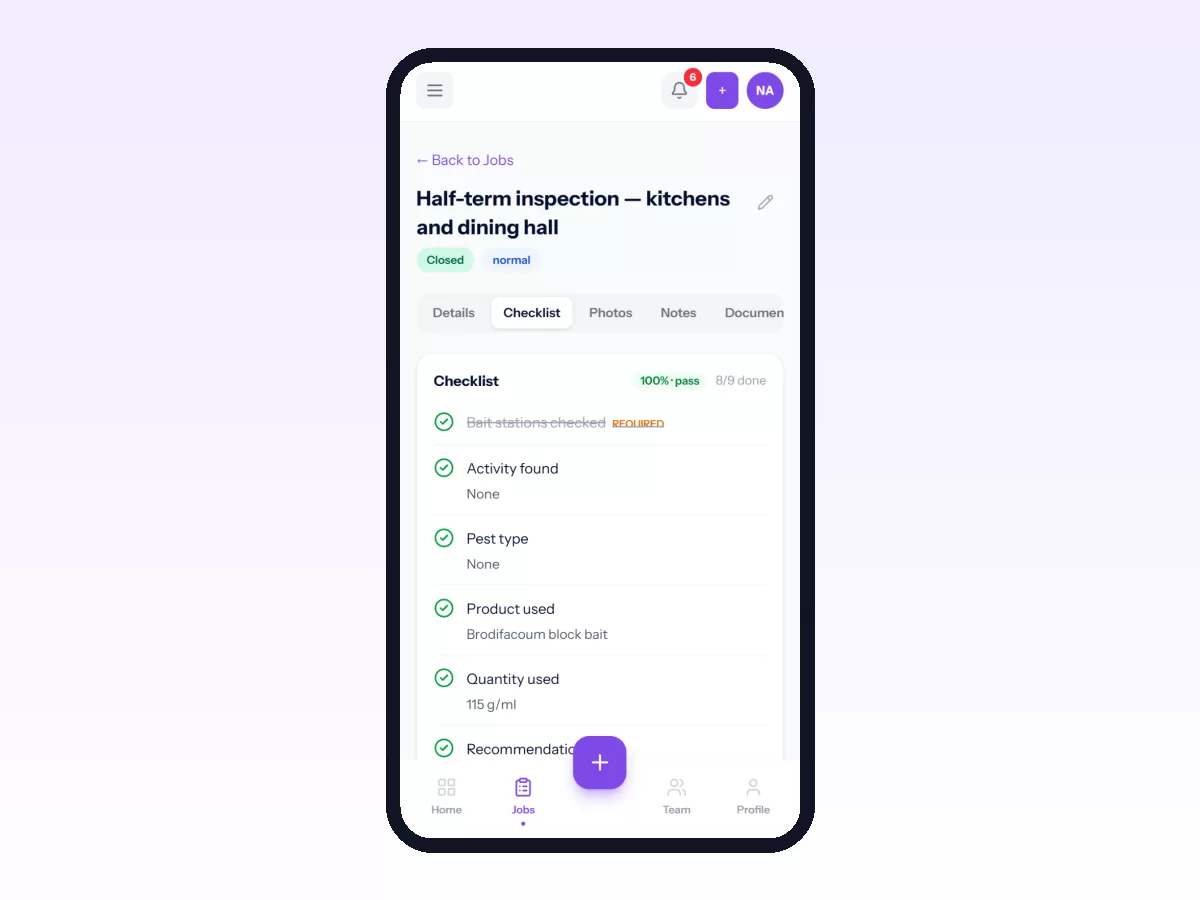
Clock-ins record location, and each organisation chooses whether live location sharing during working time is required, optional or off. Technicians get a notification on their phone when dispatch assigns or reassigns a job to them.
Start free, or read what field workforce management covers end to end.
Related: Mobile Field Service App: What Technicians Actually Need · Getting Movtro on Your Phone and Working Offline