Preventive Maintenance Software: Visits That Schedule Themselves
Preventive maintenance fails when it relies on someone remembering. How to set it up so each visit is created on time, done properly and recorded against the right equipment.
Everyone agrees preventive maintenance costs less than fixing breakdowns, and almost everyone still spends most of their time on breakdowns. Money and skill are rarely the reason. Preventive work depends on somebody remembering it, and anything urgent beats something that can wait until next week.
Preventive maintenance software is there so nobody has to remember.
What preventive maintenance actually involves
- A list of everything that needs maintaining: each machine, unit or system, what it is and where it is.
- A schedule for each one, whether monthly, quarterly, yearly or after a set number of running hours.
- A standard for each visit, meaning the checks that make up a service, done the same way every time.
- A record of each visit: what was done, what was found and what was replaced.
- Follow-up, so problems found on a preventive visit turn into planned repairs before they turn into breakdowns.
The two ways to schedule
On a fixed calendar: every three months on the 1st, or every year in March before summer. The customer knows what to expect and it's easy to plan around. It suits contracts, seasonal equipment and anything a regulation says must be inspected on a set date.
Counted from the last visit: ninety days after the last service was finished, for example. If one visit runs late the next moves back with it, so visits never bunch up. It suits equipment where the gap between services is what matters.
A third way, by running hours or meter readings, suits heavily used machinery. It needs a reliable reading at every visit, and most teams still keep a calendar date as a backstop.
Why preventive programmes fail
- Visits are raised by hand, so they get forgotten when the person raising them is busy, off sick or has left.
- Nothing has a due date, so nobody sees a missed visit until the equipment fails.
- The checklist is vague, and the preventive visit turns into a quick look.
- Findings aren't followed up. Someone writes "belt worn" in a note and the belt snaps a month later.
- When breakdowns pile up, preventive work is always the first thing to be bumped.
Setting it up so it works
- Start with the equipment that causes the most trouble when it fails, rather than everything at once.
- Record each asset properly: make, model, serial number, location and warranty.
- Write a short, specific checklist for each kind of equipment, and mark the steps that must never be skipped.
- Choose the schedule basis for each asset: fixed calendar or counted from the last visit.
- Create visits ahead of time so dispatch can plan them into the week instead of squeezing them in.
- Bring overdue preventive visits up at the weekly review and treat them as a problem to fix.
- Turn findings into jobs with a date, on the same day.
What to measure
- Preventive visits completed on time, against the number due.
- Breakdowns on equipment covered by a preventive plan, compared with equipment that isn't.
- The share of maintenance time spent on preventive work. If it keeps falling, breakdowns are winning.
See field service KPIs and maintenance technician management.
In Movtro
In Movtro, preventive maintenance runs as recurring jobs. You set the customer, site and equipment, the checklist, the technician and the schedule once. The schedule can be every so many days, weeks, months or years, on a fixed calendar or counted from when the last visit was finished, with an optional end date for the contract. Each visit is created ahead of time as a normal job, so it shows on the dispatch board and on the technician's phone. When a plan covers several assets, each recurring job can create one job per asset or one job for the whole visit. Visits still not done after their due date are flagged as overdue. Required checklist questions stop anyone completing a visit early, and every visit adds to the equipment's service history.
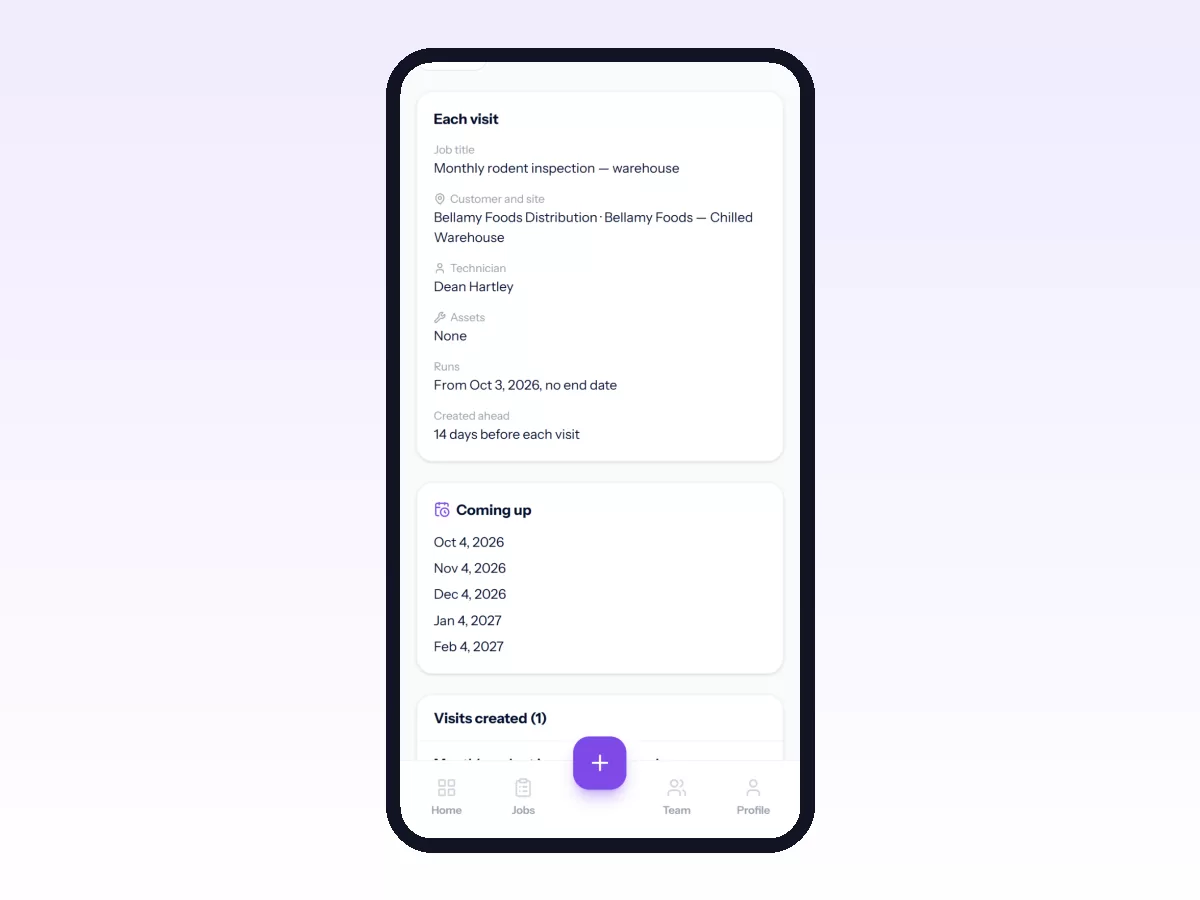
Recurring jobs are based on dates. Movtro does not schedule maintenance from running hours or meter readings. The plan's checklist can include readings as number questions with a unit and an expected range, though, so each visit records them, and a reading outside the range reports a problem on the job by itself.
See equipment and asset service history, or start free.
Related: Elevator Maintenance Management · Fire Safety Equipment Service and Inspection · Equipment Service Management: Running a Service Business on Other People's Machines · Maintenance Work Order Software: What It Needs to Do · Preventive vs Reactive Maintenance for Field Teams · Water Treatment and RO Plant Service Management · How to Set Up Recurring Jobs